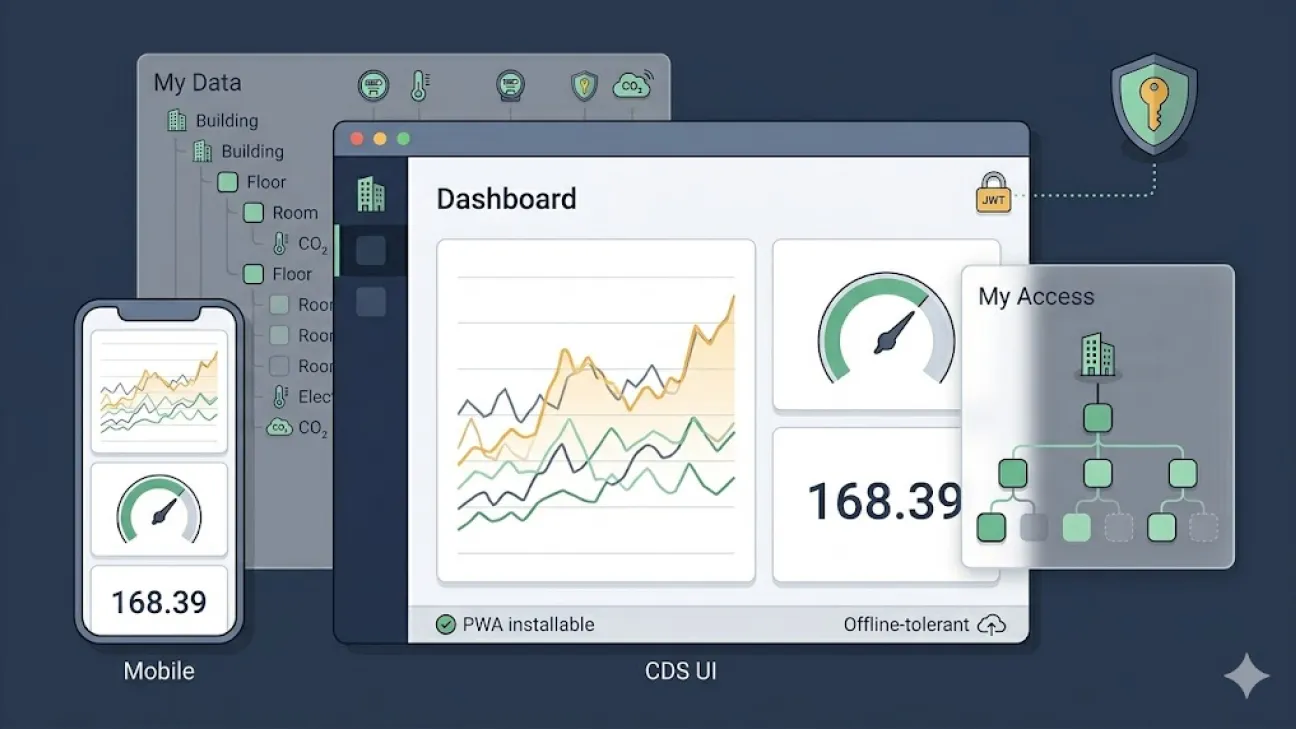
A React + TypeScript Progressive Web Application that provides browser-based, permission-aware access to data exposed by a Core Data Services (CDS) API. The CDS UI lets end users compose personalised dashboards, browse the asset and device hierarchy they are entitled to see, inspect telemetry with raw and server-side-aggregated charts, manage their own profile, and — for administrators — manage other users and edit their hierarchical access permissions through an interactive graph editor.
IoT platforms such as ThingsBoard ship administrative consoles that are not suitable for non-technical end users and, in their open-source editions, do not offer the per-resource fine-grained access control needed in multi-stakeholder deployments such as campuses, energy districts and smart-city installations. Bespoke mobile applications and 3D digital twins built on top of those platforms address some viewing needs but are not designed for the kind of interactive data exploration, dashboard composition and data export that operators and analysts require day-to-day. A dedicated browser UI, designed around the CDS API's hierarchical access model and integrated with the same Keycloak realm as the rest of the platform, fills this gap.
The pattern can be applied to any deployment that pairs a backend API enforcing hierarchical attribute-based access control (ABAC) with a Keycloak identity provider, and where multiple stakeholder groups need a unified frontend to browse, chart and export their authorised slice of the data.
- Personal dashboards. Drag-and-drop dashboard composition with three widget types — time-series chart (with optional day-ahead electricity price overlay), gauge and real-time value tile. Multiple dashboards per user, persisted server-side, displayable in full-screen kiosk mode.
- Permission-aware data browsing. "My Data" page renders the user's accessible hierarchy as an Ant Design tree with iconography, devices grouped into stable equipment categories, search-as-you-type with match highlighting, and a per-device panel that combines latest values, raw and server-aggregated history charts, static attributes, the rooms a meter measures, and (where applicable) per-device flexibility forecasts.
- Permission visualisation. "My Access" page renders the user's hierarchical permissions as an interactive graph (React Flow + dagre), with direct, inherited (** wildcard) and inaccessible nodes colour-coded; hovering a node reveals its asset name, device count and access type.
- Self-service profile management. First/last name and password change, redirected to the Keycloak account console for fields that Keycloak owns.
- Administrative user and permission management. For users holding the manage_users realm role: full Keycloak user CRUD, password reset, and permission editing through the same React Flow graph in editable mode — clicking a node opens a popover offering "grant exact access", "grant + 1 level (*)", "grant + all levels (**)" and "revoke", with a what-if preview against the live hierarchy before saving. A complementary PermissionSelector provides cascading dropdowns for power users who prefer to type URI patterns directly.
- Audit log inspection. Paginated and filterable view of the platform's tamper-evident audit log, plus an aggregated summary report (active users, top actions, most-viewed devices, IP-address breakdown, daily activity histogram).
- Mobile-first field experience. A dedicated mobile layout exposes the personal dashboards in a swipeable, full-screen-friendly UI suitable for on-site use; the app installs as a PWA, persists tokens through service-worker-coordinated refresh, and tolerates intermittent connectivity.
- Operational hygiene. Local logout flow that clears persisted tokens and propagates to Keycloak, periodic and visibility-driven token refresh, fail-safe forced logout after repeated refresh failures, and per-page activity events recorded into the platform-wide audit log so that administrators can reconstruct user behaviour through the same timeline as server-side actions.
The application is a single-page React app organised by route. A top-level AuthProvider wraps the application and integrates with keycloak-js: it initialises the OIDC flow on first load (with PKCE), restores any tokens persisted by a previous session, refreshes the access token automatically on a timer and on tab visibility changes, and exposes the current user's identity, role membership and bearer token through a React context that the rest of the application consumes.
Routes are declared centrally in App.tsx and rendered through one of two layout components: Layout (desktop, full sidebar and top bar) or MobileLayout (compact, dashboards-only) selected by a viewport hook. Administrative routes are wrapped in a ProtectedRoute that consults the user's realm roles client-side, but the backend enforces the same checks independently — the client guard is purely a UX nicety.
Page modules under pages/ correspond one-to-one with the navigable views: DashboardPage, MyDataPage, MyAccessPage, MyProfilePage, UsersPage, UserDetailPage, UserCreatePage, AuditLogsPage. Reusable components live under components/ and include the permission graph editor (PermissionGraph), the URI-based permission selector (PermissionSelector), the device telemetry panel (DeviceTelemetryPanel), the dashboard widgets (TimeSeriesWidget, GaugeWidget, RealtimeValueWidget) and supporting layout, modal and chart components. API access is centralised in api/, with one module per backend resource family (auditLogs, dashboards, hierarchy, myAccess, myData, profile, users).
In production the static bundle is served by nginx; runtime configuration (Keycloak base URL, realm, client ID, backend API URL) is injected at deploy time through environment variables consumed by a small Express server (server.mjs) that also reverse-proxies /api/* to the backend service.
The CDS UI exists to give human users a coherent, mobile-capable way to inspect the data their underlying IoT platform holds, without forcing them to interact with that platform's administrative console. Where mobile applications are constrained by their form factor and 3D digital twins are oriented towards visualisation rather than data exploration, the CDS UI is purpose-built for browsing large volumes of historical sensor data, composing personalised dashboards, exporting data for further analysis, and — separately, for administrators — managing the per-user permissions that gate access to that data.
- Frontend: React 19, TypeScript, Vite 7.
- UI library and data visualisation: Ant Design 6 (forms, tables, trees, modals), @xyflow/react with dagre for the interactive permission graph, react-grid-layout for drag-and-drop dashboard composition, D3.js for charting primitives, Leaflet with react-leaflet and proj4 for map widgets.
- Authentication: keycloak-js 26 implementing the OpenID Connect Authorization Code flow with PKCE; tokens are persisted to localStorage and to a service-worker Cache Storage entry for offline-tolerant refresh.
- HTTP client: axios.
- PWA: Web App Manifest, service worker (background token refresh, static-asset caching, offline tolerance), installable on mobile.
- Runtime serving: nginx for static-asset delivery and a small Node.js (Express) proxy in front for /api/* reverse proxying to the backend.
- Testing: Playwright for end-to-end tests, ESLint + TypeScript-ESLint for static analysis.
- Operational: Docker, Kubernetes (Deployment + Service + Ingress), GitLab CI for image build (Kaniko) and rollout.